There are a number of ways of working with JSON data in FileMaker. At least two typical ones are:
- Custom Functions based parsing & encoding
- using a WebViewer & JavaScript
There are a number of ways of working with JSON data in FileMaker. At least two typical ones are:
A new version of our free bBox FileMaker plug-in is now available.
Some of the changes since the last release are:
Various times I’ve needed to do some quick summaries of how a given server and its databases were being used. On macOS and Linux we can use shell commands such as grep to get a quick summary of what’s happening on a server.
Continue reading “Summarizing FileMaker Server Access.log data”A new version of our free bBox FileMaker plug-in is now available.
Some of the changes since the last release I blogged about are:
When you’ve been using FileMaker as long as I have, you know we’ve done all kinds of crazy things to get image masks to work on our buttons. For example, we would use a set of grouped native FileMaker line objects to cover an image just to get an ugly looking mask. I hope that not many developers suffered for too long using that technique.
Download Using Icons
As part of a shell script I’m cooking up, one of the required tasks is to list all currently hosted database files on a Mac OS based FileMaker server. This may get deployed over multiple servers, and I want to keep it as simple and trouble free as possible.
Continue reading “Listing hosted FileMaker files from the shell”
It’s FileMaker Developer Conference time, with 8 Beez in San Antonio for DevCon. We’re studying new development techniques from FileMaker Inc. and our industry peers, sharing a few methods of our own and even riding a few mechanical bulls at a real live cattle ranch!
Continue reading “hello San Antonio. hello FileMaker DevCon.”
I hope that since our previous blog post you have been exploring the possibilities created by FileMaker’s Perform Script on Server (PSoS). This article is a continuation of the PSoS discussion and includes more cool things you can do with it, specifically running database imports on FileMaker Server.
Read the follow up to this blog post at What Are Your Imports Waiting For? FileMaker Perform Script on Server – Part II
Since the release of FileMaker 13 we have been exploring a new feature called “Perform Script on Server” (PSoS) and trust me there are many cool things you can do with it. I’m going to describe how PSoS works, how it’s best implemented, and how our tests show PSoS can drastically improve database performance, more than 100x in some situations. However, there are also a number of considerations before you run wild and convert scripts to execute via PSoS. So, I’ll cover these as well.
Continue reading “100x Faster – Flight Testing FileMaker Perform Script on Server – Episode I”
Beezwax was a proud sponsor and participant in the first ever d3.unconf in San Francisco this weekend. This event was created as a one-day gathering of data visualization practitioners, centered on d3.js, a powerful and flexible JavaScript data visualization library.
As a participant-driven “Unconference”, d3.unconf allowed us to interact with other d3 devotees in sessions that ranged from “New to d3” through “Multivariate Data” and “Visualizing Neural Networks”.
Continue reading “Our d3.js Saturday – Beezwax at d3.unconf”
Applets now are required to contain additional information in their .jnlp files to document the files used, either external or local. But if you are working with older code, such as the FileMaker 11 Server Admin Console, the required manifest information is missing and your applet will halt with an exception like this:
java.lang.SecurityException: Missing required Permissions manifest attribute in main jar: http://localhost:16000/admin-client-lib/admin-console-client.jar
at com.sun.deploy.security.DeployManifestChecker.verifyMainJar(Unknown Source)
at com.sun.javaws.Launcher.doLaunchApp(Unknown Source)
at com.sun.javaws.Launcher.run(Unknown Source)
at java.lang.Thread.run(Thread.java:744)
I was looking for a way to monitor client usage of FileMaker Servers over time.
Continue reading “Enable Logging of Client Usage Statistics in FileMaker Server”
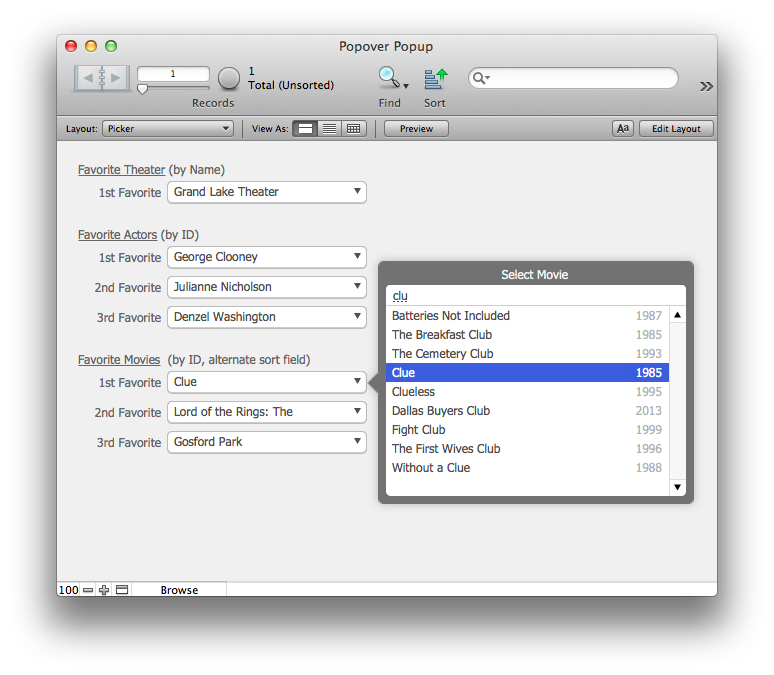
This technique uses filterable portals contained in FileMaker 13’s new Popover object to provide user-friendly pop-up menu behavior.
Download
demo file: Cancel_Clean_Up.fmp12
As FileMaker developers, sometimes we write scripts that take a long time to process data. Maybe it’s because we’re looping over many records gathering up a report. Or maybe we have set up a process — say for generating a new project, invoice or service order — that involves gathering up a list of tasks, and it takes time to do this.
Continue reading “Cancel a FileMaker Script – with Easy Clean-up”
Sometimes you just need to start over and to take a fresh look at how you are doing things. Many of you know that I usually like to start things anew, but its also understandable that this is impractical at times.
With the release of FileMaker 12, I was inspired to dive deep into how InspectorPro 4 (IP4) was architected and change my way of thinking. It isn’t about REBUILDING per se, but rather this is about RE-THINKING your solutions as you move to FM 12.
Continue reading “Re-Thinking is the new Rebuilding”
Our previous post highlighted the new capabilities of the venerable FileMaker button. In FileMaker 12’s Design Surface, the once-humble button gains new-found expressive power, enabling it to respond fluidly to user hovers, taps, and clicks via what we termed interactive formatting. The catch: interactive buttons — whether in FileMaker 12, or on any other platform — are prone to semantic misinformation, in which interactive formatting unintentionally misleads and confuses users.
Continue reading “Button Up 2: Building State-Aware Buttons”
We needed to quickly know how often various databases were being opened on a client’s server.
If you have Access logging enabled and are using a Mac OS based system, this shell snippet will give you a nice summary of how often each database has been opened:
awk -F" '{ if($3 == " opening database ") print $4;}' '/Library/FileMaker Server/Logs/Access.log' | sort | uniq -c
Unfortunately, it won’t show you a count for databases that were never opened within the scope of the current access log.
Simon.
I needed to configure a FileMaker Server (FMS) that would be an isolated system and accessible via the Internet.
Besides other precautions, like locking it down on the firewall as much as possible, changing the default SSH port, etc., I wanted to give the system some ability to defend itself against malicious access. FMS will prevent this to some extent, largely due to how the FMS Admin Console and the FileMaker client are designed.
I was trying to test out some HTTP post transactions with the curl command, and things weren’t working.
One glitch was due to how the curl command parses its options. All characters, including spaces can be significant, so “-X POST” is not the same as “-XPOST”. This difference might be hidden if calling from the shell, which trims extraneous spaces in parameters, but I was calling via the bBox plug-in’s curl function, and this calls the command directly from FileMaker.
Besides being a bit of a mouthful, debugging Apache configuration issues has gotten slightly more complicated after Apple released the Server 2.2 update for Mac OS X Server.
Formerly, you could do a basic configuration check this way:
Continue reading “Debugging Apache with OSXS 10.8 Server 2.2”