

Many FileMaker solutions need to import data—often from Excel or .csv. When this is done over a WAN, importing large datasets can be painfully slow. Years ago, we developed a technique to run imports directly on FileMaker Server instead of via the FileMaker Pro client. This significantly improved performance. With the introduction of Export Field Contents as a FileMaker Server-compabile script step, we’re now on the third generation of that approach,
An unexpected benefit of simplifying this pattern is that it becomes far more ‘AI-friendly’—the fewer moving parts, the easier it is for AI tools to understand, generate, and help maintain the workflow.
From 86 minutes to 75 seconds
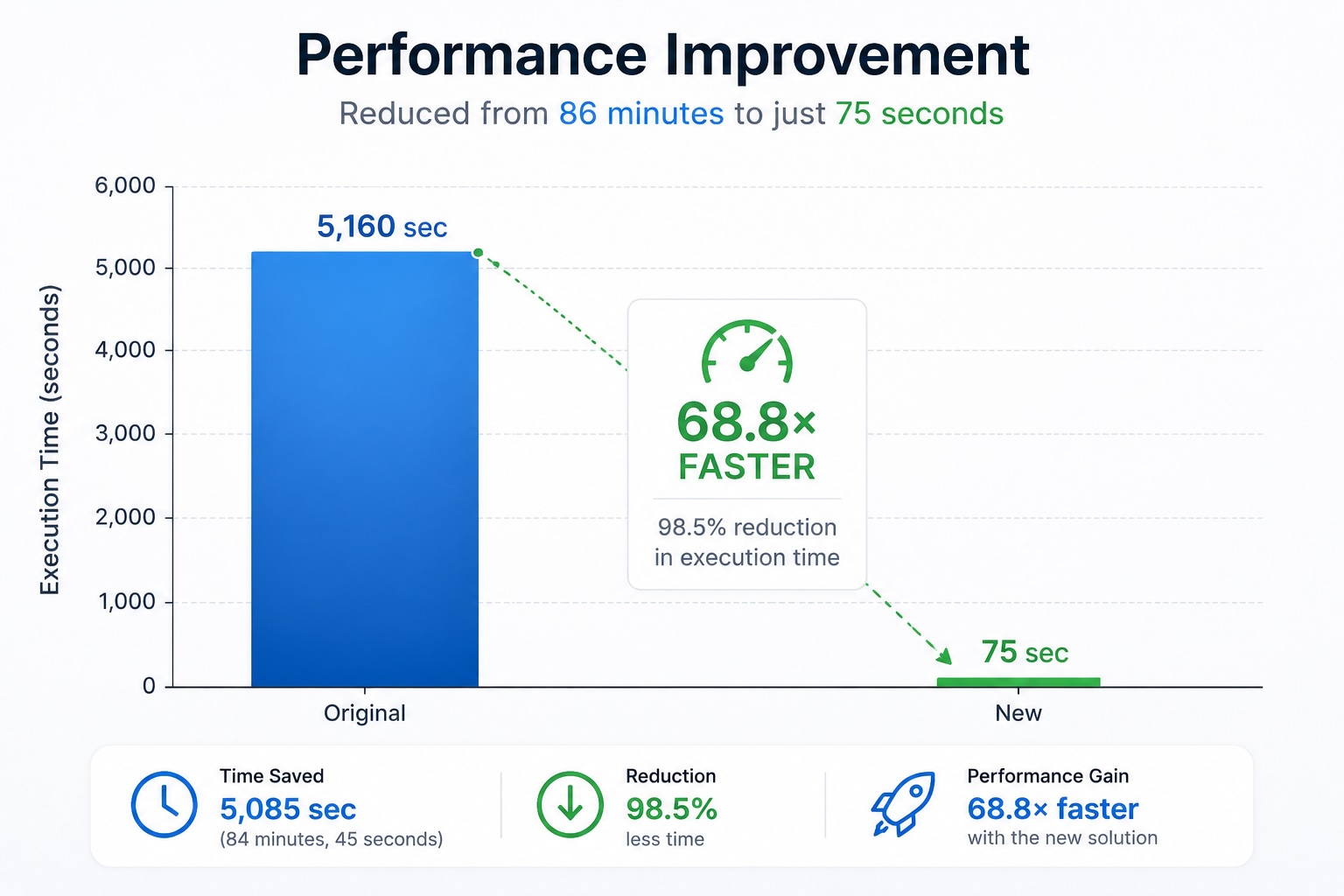
Testing using imports on FileMaker Server vs. using FileMaker Pro over a WAN…was 68.8 times faster. If you are already convinced by this chart, and just want to download the demo file, it is here:
FileMaker Import on Server Demo [Details at end of this post]
The demo file needs to be hosted on FileMaker Server v26.
I also wrote about an earlier version of this approach, years ago in Imports without Tariffs, Natively with FileMaker Server.
Imports on FileMaker Server. The core idea hasn’t changed.
FileMaker scripts running on the server can interact with two key directories:
- the Documents directory
- the Temp directory
The pattern is simple:
- Insert an Excel file into a container field
- Commit the record
- Transfer the rest of the script to run on the server
- Export the file to a server-accessible directory
- Perform the import
That’s it.
What’s New in FileMaker v26
Until now, one major limitation was that the Export Field Contents script step was not server-compatible. That forced us into more complex workarounds, especially the first iteration of this approach. What we changed it to for the second iteration was a bit easier, using file-based script steps. But with Export Field Contents we can revisit the code and simplify it even more. With FileMaker 26, the script step is compatible with running on FileMaker Server.
Export Field Contents runs on FileMaker Server.
This simplifies the entire workflow:
- fewer steps
- less data shuffling
- cleaner scripts
A Pattern of Combining Features
One thing I’ve always enjoyed is combining features in ways that unlock new possibilities. Back in FileMaker 18, the introduction of file-based script steps opened a lot of doors. This technique is really about combining three capabilities:
- File-based script steps
- Importing
- PSoS (Perform Script on Server)
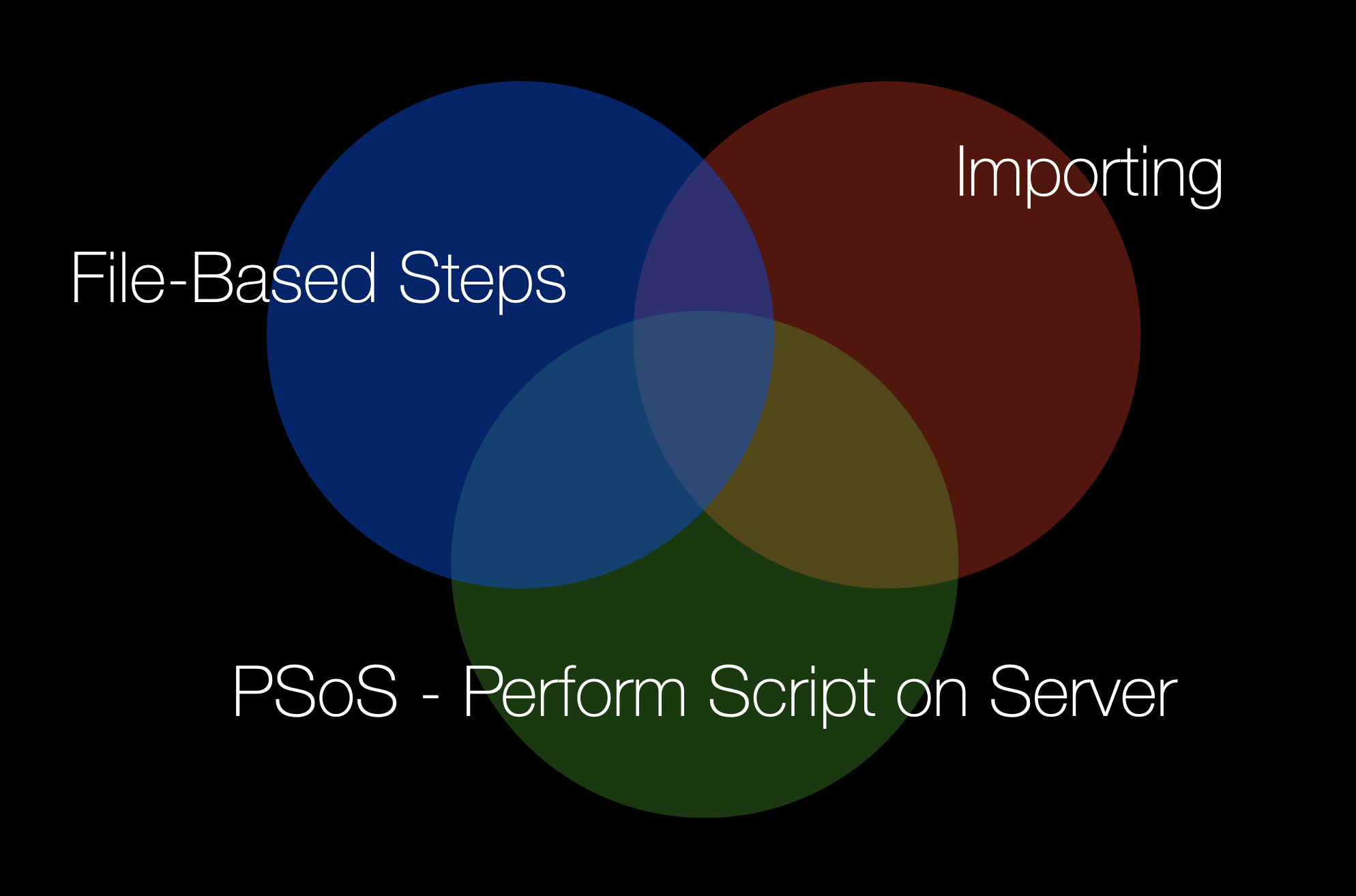
Now, with FileMaker 26, we swap one piece:
- Export Field Contents (now server-compatible)
- Importing
- PSoS
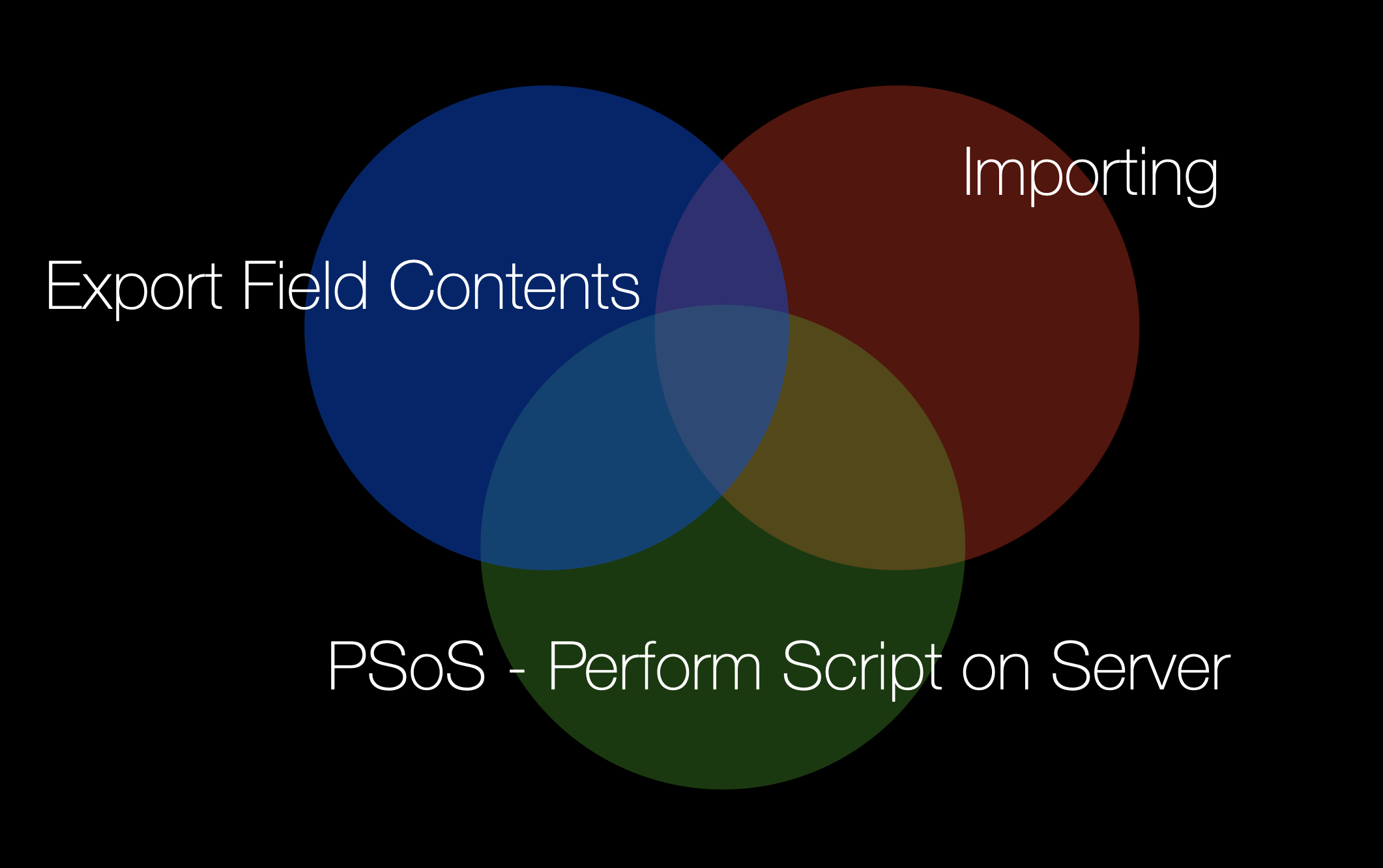
Same pattern—better tools.
For larger, longer-running imports, you could also replace PSoS with PSoS with Callback (PSoSwCB) to provide progress feedback.
Refactoring the Approach
Another reason for revisiting this technique: Refactoring.
I like simplifying things—making them more performant and easier to understand. Revisiting this workflow allowed me to remove unnecessary steps and reduce overhead.
A Note on Global Container Fields
Along the way, I ran into something interesting. For a long time, I assumed global fields existed purely in-memory. But that’s not entirely true for global container fields.
That realization explained an inefficiency in our earlier approach:
- The file was transferred once when inserted into a global container field
- Then the file was transferred again when inserted into a record (a regular container field – not global)
In other words, we were moving the same file twice! This was another opportunity to simplify.
Then vs Now
Here is the code of the earlier approach:
 #Purpose:	IMPORT FROM EXCEL
 #Param In:
 #Param Out:
 #Context:	None
 #Modified:	2019-05-06 16:26 PST - Vincenzo Menanno | Created

 # \\\\\\\\\\\\\\\\\\\\\\\\\\\\\\\\\\\\\\\\\\\\\\\\\\
 Loop [ Flush: Always ]

     #SET FLAG | CREATE IMPORT RECORD | CALL PSOS #
     Freeze Window
     Set Variable [ $_id_focus; Value:FOCUS::ID ]
     Set Field [ FOCUS::PROCESSING; 1 ]
     Commit Records/Requests
     [ No dialog ]
     #~~~~~~~~~~~~~~~~~~~~ CONTEXT
     Go to Layout [ “IMPORT” (IMPORT) ]
     #~~~~~~~~~~~~~~~~~~~~ CONTEXT
     New Record/Request
     Set Variable [ $_id_import; Value:IMPORT::ID ]
     Set Field [ IMPORT::FILE; FOCUS::FILE ]
     Commit Records/Requests
     [ No dialog ]
     #~~~~~~~~~~~~~~~~~~~~ CONTEXT
     Go to Layout [ original layout ]
     #~~~~~~~~~~~~~~~~~~~~ CONTEXT
     Set Field [ FOCUS::FILE; "" ]
     Set Field [ FOCUS::ID_IMPORT; $_id_import ]
     Commit Records/Requests
     [ No dialog ]

     If [ IsHosted ]
         Perform Script on Server [ “.  import ( ... )”; Parameter: JSONSetElement ( "" ;

         	[ "ID_FOCUS"  ; $_id_focus  ; JSONNumber ] ;
         	[ "ID_IMPORT" ; $_id_import ; JSONNumber ]

         ) ]
         #You can add some error checkhing here in case you hit the limit of how many concurrent PSoS script can be run | Get ( LastError ) = 812
     Else [  ]
         Perform Script [ “.  import ( ... )”; Parameter: JSONSetElement ( "" ;

         	[ "ID_FOCUS"  ; $_id_focus  ; JSONNumber ] ;
         	[ "ID_IMPORT" ; $_id_import ; JSONNumber ]

         ) ]
     End If

     Exit Loop If [ True // End single-pass loop ]
 End Loop
 # //////////////////////////////////////////////////
And here is the new code. Get the file inserted into a record and then call a PSoS script to do the importing on the server.
# Purpose: IMPORT FROM EXCEL ON SERVER# Modified: 2026-04-15 12:37 EDT - Vincenzo Menanno | Created# ☘️ Set Flag | Commit IMPORT Record | Call PSOS ☘️ #Freeze WindowSet Field [ IMPORT::PROCESSING; 1 ]Commit Records/Requests [ No dialog ]Perform Script on Server [ “. import ( ... )”; Parameter: IMPORT::ID ]
This code is much smaller and we could probably remove the Freeze Window script step as well. Note that we removed the drop zone and opted for the user to select the file to be imported. I am sure others might prefer a different UI or alternate approach. Note that you can also add some error handling to make sure you haven’t invoked too many PSoS processes on the server.
Next is the script that does all the work. This is the script that is called via PSoS and does the importing. The old version used the file-based script steps to create the file on disk. Plus there was support for importing different kinds of files with different extensions. I simplified that for the example to only focus on importing one file.
#Purpose: IMPORT DATA#Param In: ID_FOCUS, ID_IMPORT#Param Out: #Context: None#Modified: 2019-05-06 16:26 PST - Vincenzo Menanno | Created# \\\\\\\\\\\\\\\\\\\\\\\\\\\\\\\\\\\\\\\\\\\\\\\\\\Loop [ Flush: Always ] #DECLARE VARIABLE | FIND IMPORT RECORD # Set Variable [ $$_ID_FOCUS; Value:JSONGetElement ( Get ( ScriptParameter ) ; "ID_FOCUS" ) ] Set Variable [ $$_ID_IMPORT; Value:JSONGetElement ( Get ( ScriptParameter ) ; "ID_IMPORT" ) ] Enter Find Mode [ ] #~~~~~~~~~~~~~~~~~~~~ CONTEXT Go to Layout [ “IMPORT” (IMPORT) ] #~~~~~~~~~~~~~~~~~~~~ CONTEXT Set Field [ IMPORT::ID; "==" & $$_ID_IMPORT ] Perform Find [ ] #CREATE FILE USING FILE BASED STEPS | IMPORT (write to file can only wirte up to 64 MB at a time - therefore the loop) # Set Variable [ $_filename; Value:GetContainerAttribute ( IMPORT::FILE ; "ExternalFiles" ) ] Set Variable [ $_extension; Value:GetFileExtension ( $_filename ) ] Set Variable [ $_path; Value:Get ( DocumentsPath ) & "Import/" & GetContainerAttribute ( IMPORT::FILE ; "FileName" ) ] Create Data File [ “$_path” ; Create folders: On ] Open Data File [ “$_path” ; Target: $_file_id ] Write to Data File [ File ID: $_file_id ; Data source: IMPORT::FILE ; Write as: UTF-16 ; Append line feed: On ] Set Variable [ $_error; Value:Get ( LastError ) ] Close Data File [ File ID: $_file_id ] #~~~~~~~~~~~~~~~~~~~~ CONTEXT Go to Layout [ “DATA” (DATA) ] #~~~~~~~~~~~~~~~~~~~~ CONTEXT Set Variable [ $_start; Value:Get ( CurrentTimeUTCMilliseconds ) / 1000 ] If [ $_extension = "csv" ] Import Records [ Source: “$_path” OR “filemac:/Macintosh HD/Users/vmenanno/Desktop/Import_On_Server/SalesRecords87mb.csv”; Fields Name Row: 0; Predefined: No; Target: “DATA”; Method: Add; Character Set: “UTF-8” ] [ No dialog ] Else If [ $_extension = "tab" ] Import Records [ Source: “$_path” OR “filemac:/Macintosh HD/Users/vmenanno/Desktop/Import_On_Server/Medium_Sales_Records.tab”; Fields Name Row: 0; Predefined: Yes; Delimiter: “ ”; Target: “DATA”; Method: Add; Character Set: “UTF-8”; ] [ No dialog ] Else If [ $_extension = "xlsx" ] Import Records [ "sales_small.xlsx"; Worksheet: "Sheet1"; Fields Name Row: 0; Target: “DATA”; Method: Add; Character Set: “UTF-8”; ] [ No dialog; Data contains column names ] End If Set Variable [ $_end; Value:Get ( CurrentTimeUTCMilliseconds ) / 1000 ] Set Field [ IMPORT::ROWS; Get ( FoundCount ) ] Commit Records/Requests [ No dialog ] #REMOVE TEMPORARY FILE | REMOVE IMPORTED RECORDS | RETURN TO FOCUS LAYOUT # Delete File [ Target file: “$_path” ] #~~~~~~~~~~~~~~~~~~~~ CONTEXT Go to Layout [ “DATA” (DATA) ] #~~~~~~~~~~~~~~~~~~~~ CONTEXT Enter Find Mode [ ] Set Field [ DATA::ID_IMPORT; "==" & $$_ID_IMPORT ] Perform Find [ ] Set Field [ IMPORT::DURATION; Round ( GetAsTime ( $_end - $_start ) ; 1 ) ] Commit Records/Requests [ No dialog ] #~~~~~~~~~~~~~~~~~~~~ CONTEXT Go to Layout [ “FOCUS” (FOCUS) ] #~~~~~~~~~~~~~~~~~~~~ CONTEXT Set Field [ FOCUS::ID_IMPORT; $_id_import ] Set Field [ FOCUS::FILE; "" ] Set Field [ FOCUS::PROCESSING; 0 ] Commit Records/Requests [ No dialog ] Set Variable [ $$_ID_FOCUS; Value:"" ] Set Variable [ $$_ID_IMPORT; Value:"" ] Exit Loop If [ True // End single-pass loop ]End Loop# //////////////////////////////////////////////////
And here is the simplified version that relies on the Export Field Contents.
# Purpose: IMPORT DATA# Param In: ID_FOCUS, ID_IMPORT# Modified: 2026-04-15 12:37 EDT - Vincenzo Menanno | Created# \\\\\\\\\\\\\\\\\\\\\\\\\\\\\\\\\\\\\\\\\\\\\\\\\\Loop [ Flush: Always ] # DECLARE VARIABLE | FIND IMPORT RECORD # Set Variable [ $$_ID_IMPORT; Value:Get ( ScriptParameter ) ] Enter Find Mode [ ] #~~~~~~~~~~~~~~~~~~~~ CONTEXT Go to Layout [ “IMPORT” (IMPORT) ] #~~~~~~~~~~~~~~~~~~~~ CONTEXT Set Field [ IMPORT::ID; $$_ID_IMPORT ] Perform Find [ ] #Use Export Field Contents to Export the File (saving us many steps) # Set Variable [ $_path; Value:Get ( DocumentsPath ) & "Import/" & GetContainerAttribute ( IMPORT::FILE ; "FileName" ) ] Export Field Contents [ IMPORT::FILE; “$_path”; Create folders:Yes ] #~~~~~~~~~~~~~~~~~~~~ CONTEXT Go to Layout [ “DATA” (DATA) ] #~~~~~~~~~~~~~~~~~~~~ CONTEXT Set Variable [ $_start; Value:Get ( CurrentTimeUTCMilliseconds ) / 1000 ] Import Records [ Source: “$_path”; Fields Name Row: 0; Predefined: No; Target: “DATA”; Method: Add; Character Set: “UTF-8”; [ No dialog ] Set Variable [ $_end; Value:Get ( CurrentTimeUTCMilliseconds ) / 1000 ] #Once the import is completed we can update the parent record from any of the import records # Set Field [ IMPORT::DURATION; Round ( GetAsTime ( $_end - $_start ) ; 1 ) ] Set Field [ IMPORT::ROWS; Get ( FoundCount ) ] Set Field [ IMPORT::PROCESSING; 0 ] Commit Records/Requests [ No dialog ] Set Variable [ $$_ID_IMPORT ] Exit Loop If [ True // End single-pass loop ]End Loop# //////////////////////////////////////////////////
Summary
Revisiting and modernizing the code has value in different ways. It means less technical debt (and in this case it provides more clarity). That means when someone has to use this pattern again it’s easier to pass along and to understand for developers.
AI also cares about it. Reducing technical debt doesn’t just make code easier for humans—it also makes it more accessible to AI tools. Cleaner, more linear scripts are easier to generate, reason about, and maintain with AI assistance.
Demo: Imports on FileMaker Server
- GitHub download link
- software is named “Import_On_Server.fmp12”
- download folder includes
Import_On_Server.fmp12,Small_Sales_Records.csv,LICENSE, images andREADME.md - ~11.4 MB download
Username: admin
Password: [none...add to file if hosting on FileMaker Server]
The demo file needs to be hosted on FileMaker Server v26.
One thought on “Imports on FileMaker Server, But Better”
Comments are closed.