

Everyone’s talking about AI agents, including us. But making agents actually useful in a business context – not just a clever demo – requires more than a chat prompt. You need orchestration: a way to give agents access to real tools, enforce structure on their outputs, and debug them when things go sideways.
At Beezwax, we’ve been building AI agents on top of n8n, an open-source workflow automation platform. n8n acts as the control plane: it handles triggers, authentication, tool routing, and LLM orchestration so we can focus on the business logic.
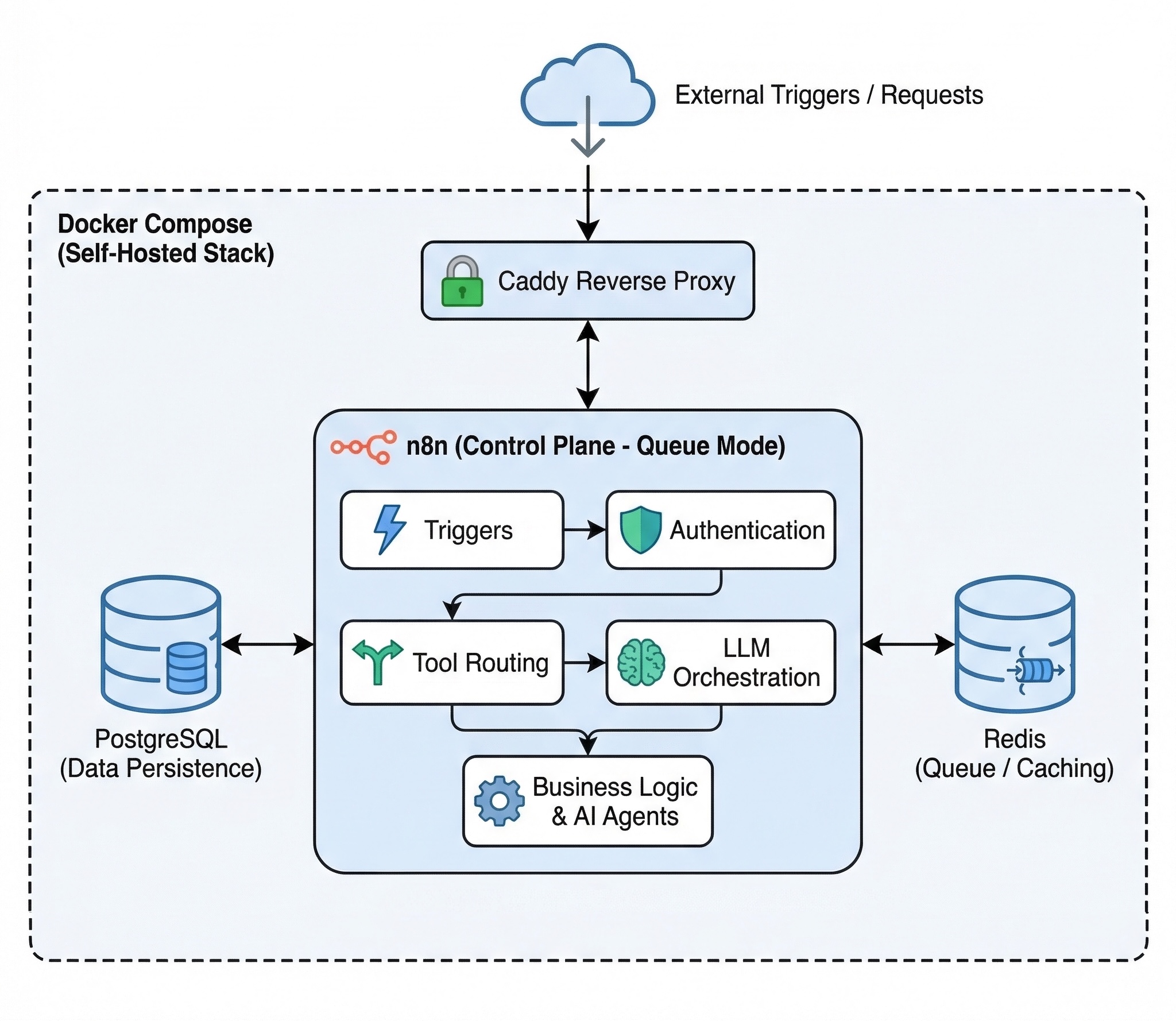
Self-hosted AI Agent Stack on n8n with Docker Compose
Everything runs on a single self-hosted stack:
- Docker Compose
- PostgreSQL
- Redis
- n8n in queue mode
- Caddy reverse proxy
Workflow JSON files are version-controlled in Git and deployed via CI/CD.
Here are two workflows we built that show what this looks like in practice:
Workflow #1: Slack Assistant with 40+ tool nodes
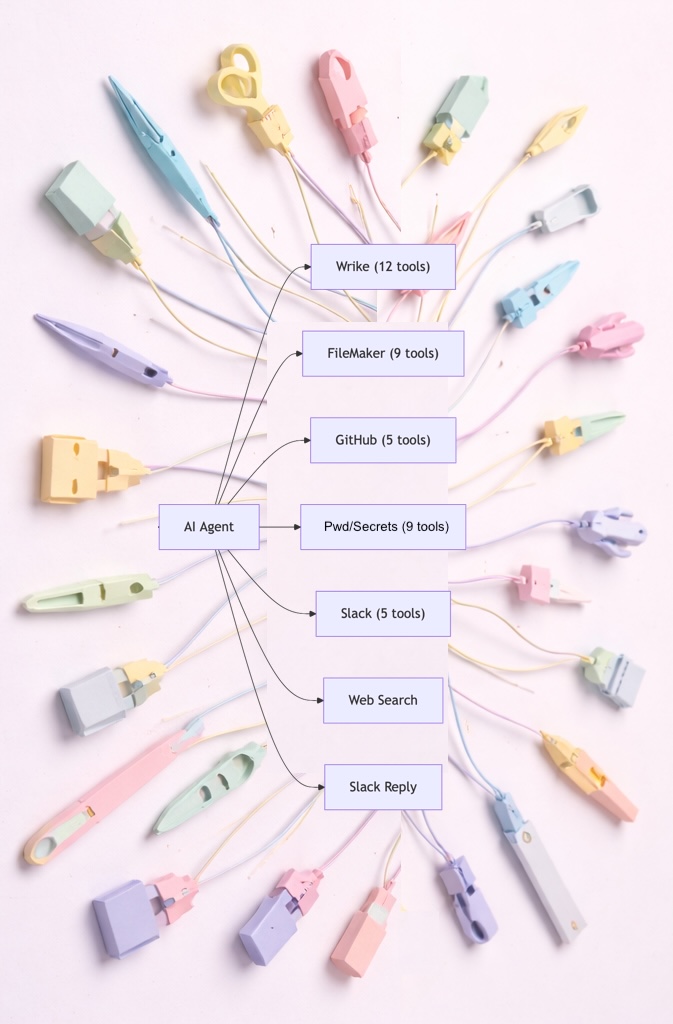
Our team juggles Wrike for project management, FileMaker for client data, GitHub for code, password/secrets repo for credentials, and Slack for communication. Switching between six dashboards to answer a simple question (“Who’s assigned to the Acme project and do they have repo access?”) is a tax on everyone’s time.
So we built a Slack-based AI assistant. Team members send a message in Slack, and an n8n workflow picks it up, runs it through an LLM, and lets the model call whichever tools it needs to get the job done.
The architecture leans on a few patterns that n8n makes straightforward:
1. Tool composition.
Each API endpoint is its own n8n tool node.
This includes dedicated authentication and a natural-language description. As examples:
- “search Wrike tasks,”
- “list GitHub collaborators”
- “get a repo item password”
The LLM reads those descriptions and picks the right tool (or chain of tools) for each request. Adding a new capability is just adding a node; no code changes to the agent itself.
2. Session memory.
The assistant remembers context across messages.
n8n’s Buffer Window memory node keeps conversation history keyed by Slack channel. Ask “Who’s on the Acme project?” and then follow up with “Add Sarah to it” – the assistant knows what “it” refers to.
3. Swappable models.
Switching from GPT to Claude is a toggle, not a rewrite.
The workflow has both an OpenAI and an OpenRouter connection wired up. We use this to test new models against the same tool surface without touching the rest of the pipeline.
The result: a single conversational interface that replaces tab-switching across six systems.
Workflow #2: The ‘Opportunity of Interest’ Crawler

A business development team at a manufacturing consultancy used to start every morning the same way – manually checking industry portals, blogs and social media for news and announcements about new facilities, then eyeballing each one to decide if it was worth pursuing. It took about an hour and was easy to miss things.
We replaced that with an n8n workflow that runs daily at 6 AM:
Discovery via LLM web search
The workflow first calls xAI’s Grok model with its built-in web search tool, passing a prompt that targets industry news sources, keywords, and geographic focus areas. Grok turns this raw data into a structured list of potential opportunities — sub-industries, companies, initiatives, announcements — extracted from live web results. At this point in the sales funnel, these aren’t leads, yet — so we informally, and lovingly, refer to them “Opportunities Of Interest”.
Qualification via a second LLM
Raw leads aren’t useful if 80% of them are irrelevant. Each interesting opportunity passes through an OpenAI call (GPT-5-mini in JSON mode) that scores it against a three-dimension sales quality framework:
- Scope Fit
- Industry & Process Fit
- Economic & Strategic Fit
A red-flag gate catches immediate disqualifiers (clearance requirements, business restrictions, excluded geographies) before scoring continues. The output is a classification — Prospect, Lead, Research, or Ignore — plus a short rationale.
Deduplication and task creation
Before creating anything, the workflow fetches existing Wrike tasks and deduplicates. New opportunities land as tasks, which are linked to contact data in our CRM. Priority badges are determined by the qualification score and the full analysis embedded in the task descriptions.
Our next phase of development includes automating further lead deep research through agents, and coordinating GEO (Generative Engine Optimization) through marketing tools.
For now, the biz dev team is incredibly happy to start their morning with a pre-filtered, pre-qualified action list in Wrike. Instead of a browser full of links to news, their opportunities just got more interesting.
Why n8n as the Agent Control Plane
We evaluated several approaches — custom Python scripts, LangChain, cloud-hosted agent platforms — before settling on n8n. A few things tipped the decision:
Visual debugging
Every workflow execution is logged and inspectable node by node. When an agent picks the wrong tool or an API returns unexpected data, you can click through the execution and see exactly what happened at each step. This matters more than you’d expect when you have 40+ tool nodes.
Self-hosted
Our workflows touch password/secrets repos, FileMaker databases, and client project data. Credentials and payloads never need to leave our server (or yours). For regulated or privacy-sensitive environments, this is non-negotiable.
GitOps deployment
Workflow JSON files are the source of truth. We have dev and prod environments, a Makefile for local deploys, and GitHub Actions for CI/CD. Pushing to the dev branch deploys dev workflows; merging to main promotes to production.
Extensibility without SDKs
Any REST API becomes an agent tool via n8n’s HTTP Request nodes. No client library, no SDK version conflicts — just a URL, headers, and a description the LLM can read.
What We Learned
A brilliant LLM that can’t actually do anything in your business systems is just a chatbot.
Agents are only as useful as their integration surface. n8n gives us a way to wire AI into the tools that actually run the business — visually, version-controlled, and without sending credentials to a third-party platform.
If you’re exploring AI automation for your team, we’d love to chat about what’s possible.